

TL;DR
- Problem: You built an automation prototype but teams ignore it, models drift, or adoption stalls because people and governance were an afterthought.
- Quick answer: Use an ai process automation change management playbook that pairs clear adoption KPIs, a RACI for automation projects, a training plan for ai automation, and incentives tied to automation adoption metrics to move from pilot to scale.

Executive summary — why change management is the critical scaling lever
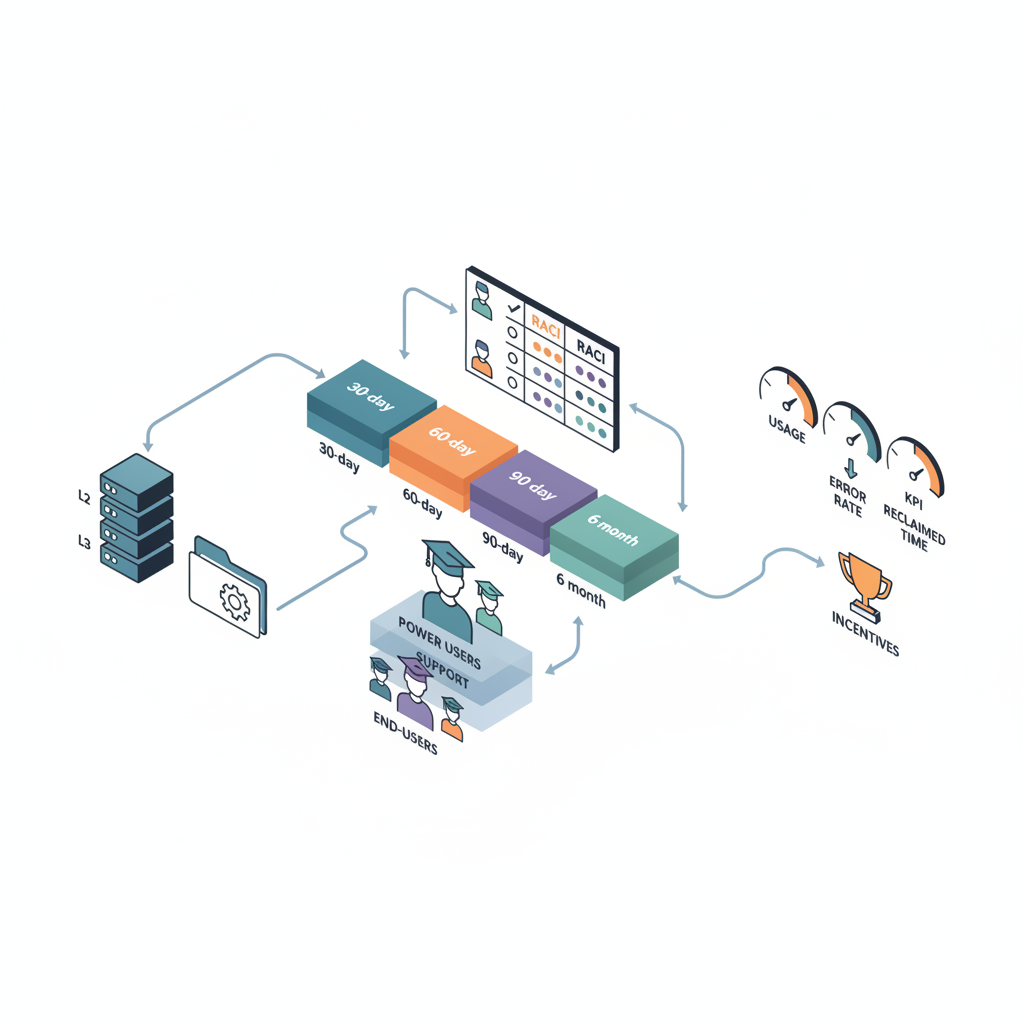
Without focused change management, most AI process automation pilots stay pilots. You can have a high-accuracy model, neat orchestration, and a slick UI—yet adoption fails because daily users don’t trust the outputs, support can’t fix edge cases, or the business lacks a clear metric to reward use. The ai process automation change management playbook solves that by aligning roles, measurement windows, training paths, communications, and incentives so automation becomes part of how work gets done.
Practical example: a marketing operations team automates content tagging but sees only 12% of campaigns use it after two months because tagging errors and no owner for exceptions exist. Fixes: assign an Automation Owner, publish weekly error dashboards, and run a targeted retraining session—adoption climbs.
When not to productionize
Do not productionize when you cannot evaluate outputs, when governance cannot audit decisions, or when the cost of failure exceeds business value. If a process has unpredictable data inputs or requires human judgment in every case, pause and redesign the scope.
Define success: adoption KPIs and measurement windows (30/60/90 days, 6 months)
Define success as measurable adoption and impact. Use adoption rate = percentage of eligible processes actively using automation. Set initial targets: 10–20% adoption within 90 days for complex processes; 20–50% within 6–12 months for lower-complexity tasks. Track both short windows (30/60/90 days) and medium windows (6 months) to spot early friction and sustained value. For more on this, see Scaling ai process automation.
Example KPIs (quotable): "Adoption rate is the percent of eligible processes actively using automation." "Target 10–20% adoption within 90 days for complex workflows." Track these KPIs weekly for 90 days, then monthly.
| Role | Primary responsibility | Recommended KPI |
|---|---|---|
| Automation Owner | Business-facing owner; prioritizes use cases and approves releases | % adoption in owned process; time-to-fix exceptions |
| Automation Engineer | Builds and maintains automations | Mean time to repair; regression test pass rate |
| Business Sponsor | Approves funding and incentives; removes org blockers | FTE hours reclaimed; ROI vs target |
Include automation adoption metrics such as: active runs per eligible process, error rate per run, exception queue size, and estimated FTE time reclaimed. For regional differences, enterprises may need localized training and slower cadence; SMBs can move faster but need lightweight governance. Record these as baseline before rollout.
Organizational roles & governance (RACI for automation initiatives)
Clear governance prevents finger-pointing. Use a RACI for automation projects that maps who is Responsible, Accountable, Consulted, and Informed for each phase: discovery, build, validate, deploy, and operate. Example: the Automation Owner is Accountable for discovery and adoption; Automation Engineer is Responsible for build; Compliance is Consulted for data use; Operations is Informed at deploy.
Practical RACI snippet for a single automation:
- Discovery: R=Business analyst, A=Automation Owner, C=Automation Engineer, I=Business Sponsor
- Validation: R=Automation Engineer, A=Automation Owner, C=QA, I=Support
- Operation: R=Support L2, A=Automation Owner, C=Security, I=Business Sponsor
An automation is production-ready only when a named owner can fix exceptions within the SLA and training materials exist for end users.
Training & enablement curriculum (power users, support, end-users)
Train three cohorts: power users who champion workflows, support teams who handle L2/L3 issues, and end-users who interact with outputs. Structure a training plan for ai automation with role-specific modules: concept (why automation), hands-on (how to use), troubleshooting (common failures), and escalation paths.
Example curriculum for 2-week onboarding:
- Day 1: overview and goals (all)
- Day 3: hands-on for power users (build and tweak rules)
- Day 7: support runbook walkthrough (L2 scenarios)
- Day 10: end-user practice + feedback session
Communications plan — messages, channels, cadence
Adopt a communications plan that moves people from awareness to habitual use. Messages change over time: initial announcement (why this helps you), weekly adoption updates (usage, wins), and monthly case studies (real outcomes). Channels: email for formal updates, Slack or Teams for quick alerts, and a dedicated intranet page for documentation.
Cadence example: announcement at kickoff; twice-weekly tips during the first 30 days; weekly error and usage digest for owners; monthly executive summary. Use short, quotable metrics in comms: "This automation reclaimed an estimated 40 hours last month." That concreteness builds trust.
Incentives & behavior design to drive adoption (KPIs tied to incentives)
Link incentives to measurable KPIs. For sales or marketing teams, tie a small quarterly bonus or recognition to adoption rate or FTE hours reclaimed in their scope. For engineers and power users, include automation quality metrics in performance reviews: regression test pass rate, time to fix exceptions, or responsiveness to incident tickets.
Behavior design tactics: default opt-in for eligible processes, simple in-app nudges, and monthly leaderboards. Example: a content team gets a peer-recognition badge when adoption exceeds 30% across eligible campaigns. Make incentives visible and tied to automation adoption metrics so usage becomes a shared target.
Operations & support model for scaled automation (L2/L3 support, runbooks)
Scale requires predictable operations. Define an L1/L2/L3 model: L1 triages and routes, L2 fixes routine exceptions (parameter tweaks, data format issues), L3 handles architecture or model retraining. Document runbooks for each common error: symptoms, root cause checks, temporary workarounds, and permanent fixes.
| Runbook section | Contents |
|---|---|
| Symptom | Failure mode description and sample logs |
| Immediate action | Steps to remove users from error state (2–3 commands) |
| Root cause checks | Data schema, model confidence threshold, external API health |
| Escalation | When to notify L3 and business owner |
Runbooks must include a stop-gap workaround that protects business flow while engineers fix root causes.
Measurement framework — leading and lagging indicators (usage, error rates, FTE time reclaimed)
Combine leading indicators (active users, daily runs, exception queue length) with lagging indicators (error rate, FTE hours reclaimed, ROI). Example thresholds: target error rate under 5% for production automations; P95 latency under a conditional threshold depending on your app (for typical SaaS, aim under 200ms where interactive).
Automated dashboards should surface: adoption rate by process, weekly error trends, mean time to repair, and estimated FTE time reclaimed (use conservative time-savings multipliers). These automation adoption metrics inform decisions: continue, pause, or expand.
Case study template and rapid pilot-to-scale checklist
Use a one-page case study template capturing: scope, baseline metrics, implementation steps, adoption KPIs, issues encountered, and outcome. This template helps replicate successes across teams.
| Pilot-to-scale checklist | Done |
|---|---|
| Define scope and eligible processes | |
| Assign Automation Owner and RACI | |
| Baseline metrics collected | |
| Training & support scheduled | |
| Communications plan approved | |
| Go/no-go decision after 90 days |
Common pitfalls and mitigation playbooks
Pitfalls are predictable: missing owner for exceptions, insufficient training, and neglecting error budgets. Mitigation playbooks should include: enforce a named owner before deploy, require a minimum of two power users per team, and set an error budget (e.g., max 5% errors) that triggers rollback or remediation.
Worked example: when an NLU classifier dropped below confidence thresholds, the playbook required temporary human review, immediate data capture for retraining, and a 2-week monitoring window before re-enabling full automation.
90-day adoption sprint plan and scaling roadmap
Structure a 90-day sprint with focused outcomes. A concise checklist works best for featured snippets:
- Day 0–7: finalize scope, assign Automation Owner, baseline metrics.
- Day 8–30: deploy pilot, run training sessions, collect feedback and exception logs.
- Day 31–60: fix top three failure modes, publish usage dashboard, start incentives.
- Day 61–90: evaluate adoption rate vs target (10–20% for complex), decide scale plan or rollback.
After 90 days, roll into a quarterly scaling roadmap: regional rollouts, training localization, and formal governance transfers.
Conclusion — checklist and governance handoff
Hand governance off with a short checklist: confirmed Automation Owner, published runbooks, trained cohorts, active dashboards, and documented ROI. The ai process automation change management playbook turns engineering work into operational change by pairing measurement, roles (raci for automation projects), training (training plan for ai automation), and incentives tied to automation adoption metrics.
Final quotable: "Adoption rate measures whether automation is used, not just deployed." Use the checklist above to hand off governance and begin scaling.
FAQ
What is change management playbook to scale ai process automation? The ai process automation change management playbook is a structured set of practices—roles, RACI for automation projects, KPIs, training plan for ai automation, communications, and incentives—designed to move automations from pilot to sustained use.
How does change management playbook to scale ai process automation work? It works by aligning owners, measuring adoption and impact with automation adoption metrics, training users and support, and embedding incentives so teams choose automation as the default way to work.