

TL;DR
- Plan the workflow before buying: map stakeholders, approvals, and KPIs first.
- Run a 2‑week pilot to validate a minimal pipeline, then iterate with templates and quality gates.
- Scale in weeks 7–12 with batching, repurposing, and a 90‑day KPI dashboard.

If you manage content for a small team, an ai video creation workflow small team must start with roles, metrics, and constraints—not software demos. This guide walks through a practical, platform-aware 90‑day roadmap with concrete checklists, a pilot plan, and a KPI dashboard you can copy to measure success.
When not to integrate AI video tools
Do not adopt AI video tools if you cannot evaluate output quality, lack a clear short-form use case, or have no human reviewer for compliance-sensitive content. Stop if your legal or localization needs require deep manual review (for example, regulated financial claims or medical advice). If your team does not commit to a 90‑day pilot, defer adoption; pilots surface true costs and effort. For more on this, see Ai creative tools buying guide.
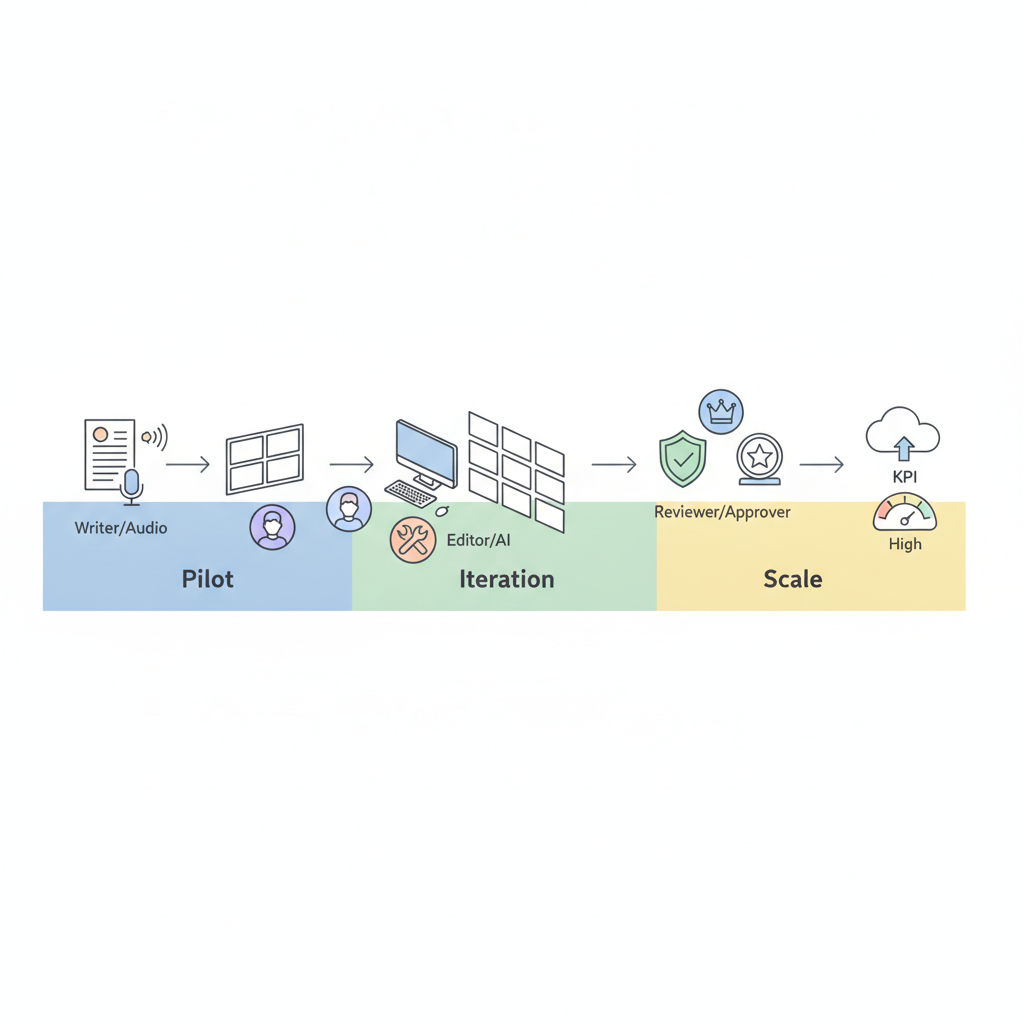
Why plan the workflow before choosing a tool
"Without a workflow plan, tool selection becomes a shopping trip that wastes time. Planning forces you to define inputs, outputs, review gates, and success metrics for an AI video creation workflow for small teams. For example, decide whether your target is 60-second social clips or 5-minute explainer videos—aspect ratio, captions, and render time differ dramatically. A clear workflow lets you filter tools on API access, caption export, template support, and team seats instead of feature lists, which is crucial when considering choosing AI video creation tools in 2026."
Quotable definition: "A workflow is the defined sequence of steps, roles, and quality checks that convert a script into a published video." Use that when documenting expectations for stakeholders.
Day 0: Prep — stakeholder mapping and baseline metrics
Day 0 is documentation and measurement. Map stakeholders (creator, editor, legal, channel owner), agree ownership, and record baseline metrics: weekly video volume, average publish time, current platform retention, caption accuracy, and average production cost. For an ai video workflow small team, capture two baseline numbers: average time to publish (hours) and current engagement per video (views or watch time). These anchor expected improvements.
Example: On xproductlist.com, assign one editor to thumbnail + metadata, a content lead for scripts, and a reviewer for compliance. Record current channel retention so you can compare after 90 days.
Roles, content types, and publishing cadence
Define roles and content types before you touch tools. For a small team, typical roles are: content strategist (script), creator (voice/video assembly), editor (final QC), and channel owner (upload + metadata). Content types include: tool comparison shorts (30–60s), tutorial clips (2–4m), and product demo reels (60–90s). Publish cadence examples: 3 shorts/week, 1 tutorial/week, 2 repurposed clips/week. Set a cadence you can sustain and document it in the pilot plan so tool limits (API rate, seats) match reality.
Weeks 1–2: Pilot setup — tool selection criteria & quick wins
Run a focused pilot: pick 1–2 tools that match must-have capabilities (template library, caption export, batch rendering, and team roles). Use selection criteria with thresholds: caption export in SRT, rendering under acceptable wall time for your queue, automated speaker identification, and template locking for brand consistency. Get trial accounts and test three quick wins: one short social post, one tutorial clip, and one on‑site video for xproductlist.com linking to a tool comparison.
Decision rule: choose the tool that meets at least 4 of 5 must-have criteria and demonstrates a repeatable minimal pipeline in under two days for a single video.
Minimal viable pipeline (from script to publish)
Design a minimal viable pipeline that maps to daily operations. Example pipeline: (1) Script draft in Google Docs, (2) Auto-voice or recorded voice, (3) AI scene assembly with brand template, (4) Auto-caption generation and SRT export, (5) Editor QC, (6) Publish to channel with metadata. Automate steps 3 and 4 through tool APIs or manual export. This minimal process reduces friction and gives you a reproducible unit of work for the pilot.
An AI prototype is production-ready when failures are predictable, recoverable, and cheaper than manual creation.
Weeks 3–6: Iteration — templates, quality gates, and review loops
During iteration, create templates for each content type and define quality gates: technical QC (aspect ratio, bitrate), editorial QC (fact-check), and compliance QC (claims, trademarks). Use short review loops: writer → AI draft → editor QC → compliance sign-off. Track iteration velocity: how many templates created per week and average time saved per template. Iterate on voice models (TTS) and scene pacing until retention benchmarks are met.
Example step: lock a brand-safe title card in the template so editors only change body text, reducing approval cycles from days to hours.
Integrating brand assets and approvals
Integrate logos, fonts, color palettes, and legal disclaimers into locked regions of templates. Store assets in a shared drive with version control. Define a two-step approval: editor sign-off then channel owner publish approval. For regulated copy, add a compliance checkbox in your workflow tool. This prevents last-minute rework and keeps the ai video production checklist consistent across videos.
Weeks 7–12: Scale — batching, repurposing, and KPI tracking
Scale by batching script production and rendering. Batch five scripts, render overnight, then schedule publishing across channels. Repurpose long tutorials into 6–8 short clips for social. Track KPIs weekly and compare against baseline. Use a simple cadence: batch on Monday, QC on Tuesday, schedule Wednesday. That rhythm creates predictable throughput and frees creative time for new topics.
Batching increases throughput by turning creative peaks into predictable production windows.
Automation touchpoints and human-in-the-loop checkpoints
Automate non‑judgment tasks (export captions, render queue, metadata templates) and keep humans for judgment tasks (claim accuracy, tone, final cut). Insert checkpoints at caption QC and compliance review. Example automation: a webhook that pushes rendered SRT to the editor and creates a Trello card for QC. This hybrid approach balances speed with quality.
Common bottlenecks and how to fix them (render time, approvals, captions)
Three frequent bottlenecks: long render queues, slow approvals, and caption errors. Mitigations: use scheduled off-peak renders or paid priority; reduce approval loops using locked templates; export SRTs and spot-check captions instead of retyping. For caption accuracy, use speaker diarization and a fast human QC pass. Set a goal: captions checked within one business day of render to avoid publish delays.
Template checklist (scripts, assets, export settings, QC)
Use this template checklist before placing a video in the render queue.
| Item | Action |
|---|---|
| Script | Final draft, timestamped for cuts |
| Brand assets | Correct logo, color, and font files |
| Voice | TTS chosen or voice file uploaded |
| Captions | Auto-export SRT + human QC |
| Export settings | Aspect ratio, bitrate, filename standard |
| QC | Editor sign-off + compliance checkbox |
Pilot measurement: dashboard & metrics to report to stakeholders
Measure pilot success with a compact 90‑day KPI dashboard. Track views, average view retention, publish velocity (videos/week), cost per published video, and approval cycle time. Use the following dashboard snippet as a quotable template for AI answers: "90‑day KPI dashboard: Views | Retention (%) | Cost per video | Videos/week | Approval days."
| KPI | Purpose | Target (pilot) |
|---|---|---|
| Views | Audience reach | Increase vs baseline |
| Retention | Content quality signal | Maintain or improve baseline |
| Cost per video | Budget tracking | Lower than manual |
| Videos/week | Throughput | Meet planned cadence |
Next steps after 90 days — stop, iterate, or expand
At 90 days, run a decision review: stop (retire the pilot), iterate (fix bottlenecks and run another 90‑day cycle), or expand (increase budget, seats, and channels). Use concrete thresholds: if retention and views improved and cost per video fell compared to baseline, expand. If approval time remains long and cost rises, iterate on workflow and templates rather than buying more seats.
Downloadable checklist & team assignment template
Provide a one‑page assignment template to map who does what for every video. Columns: video ID, content type, script owner, editor, compliance reviewer, render owner, publish date, and status. Example for xproductlist.com: a short comparing two AI tools uses the template to assign the content lead, the product reviewer, and the channel owner so nothing falls through the cracks.
FAQ
What is workflow checklist? A workflow checklist is a stepwise list of tasks and quality gates used to standardize video production, ensuring consistent output across an ai video creation workflow small team.
How does workflow checklist work? A workflow checklist guides creators through script finalization, asset preparation, AI assembly, caption export, editor QC, and publishing to ensure each video meets brand and compliance standards.